
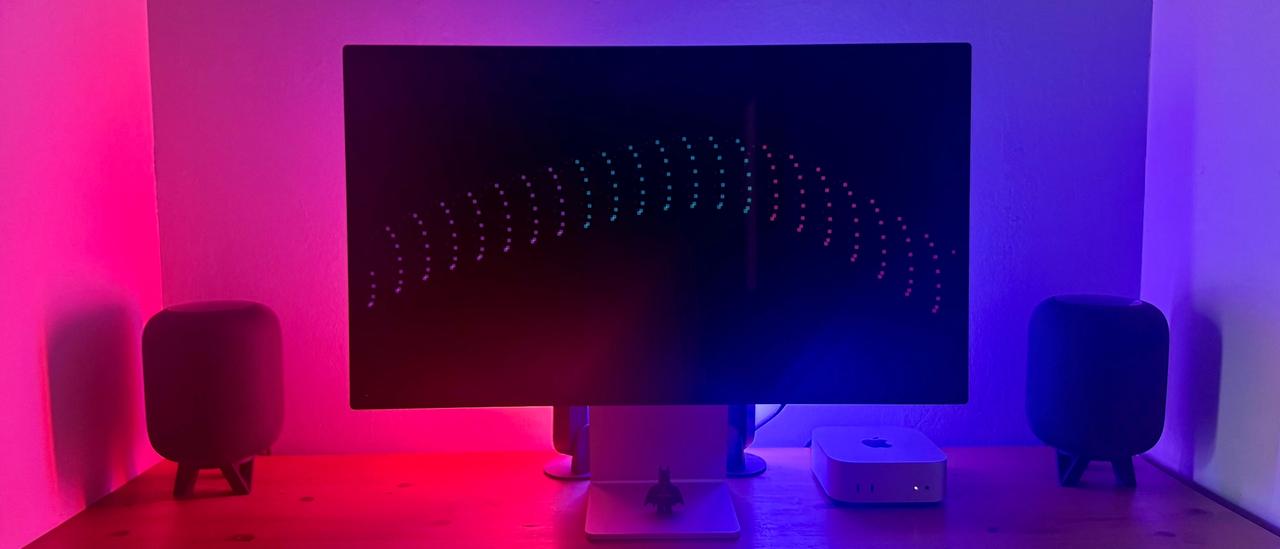
The Desk
As I spend so much of my time coding, I figure it's essential to make it a great place to be.
M6 Mac Mini
The newest addition to the desk, and it’s remarkable how much power Apple has packed into something this small.
Studio Display
The centrepiece of the desk. That 5K panel is sharp, bright and makes everything on it look fantastic, from code to photos.
Magic Mouse & Keyboard
Truly a creature of habit - I've been using these for years to the point anything else feels weird.
I've tried other keyboards over the years, some of which I actually liked the key feel more - but they still felt comparatively weird.
12.9" iPad Pro
I use an iPad Pro for a clean & cable-free secondary display over AirPlay.
It's quite simply the most universal & fully-featured secondary display you can get - with added bonus of being perfect for media consumption when I'm not working.
HomePods
It's a proven fact that devs write better code when listening to dope beats, (probably).
I have 2 OG HomePods set up as a stereo pair, placed either side of the Studio Display. Although they are on the pricey side, the soundstage is very impressive for their size and have more than enough output to fill the room I work in.
Hue Play Bars
Only here for aesthetic purposes, but I love them 😍
I have 3 Play Bars placed vertically behind the Studio Display, usually set to some form of subtle colour loop for the vibes.
You can do some cool automations with these too, for example when one of my GitHub actions successfully completes, pulse green 3 times.
Coffee
It's amusing how useless I am to anyone, for anything, without a cup of coffee to start the day.
Development Tools
Visual Studio Code
The gold standard of editors when it comes to DX.
I've used a whole bunch of different editors throughout my developer journey, notable mentions include Coda, Atom, Nova & Brackets, but nothing compares to the mighty VS Code in my humble opinion.
I've been using VS Code since it was first released in 2015. I love how extensible & flexible it is, even on a per project basis if need be.
Claude Code
My day-to-day AI pair programmer, in the terminal and right inside VS Code. It's brilliant at the legwork - porting patterns between projects, chasing down type errors, roughing out the first pass of a feature - which frees me up for the decisions that actually matter.
It's a tool, not a substitute for judgement, so I keep it on a short leash. We agree a plan before any code gets written, and each project has its own conventions (AGENTS.md, CLAUDE.md and reference projects) so the output reads like code I'd write myself. Types, lint and builds have to pass, I check the result in the browser, and I read every diff before it's committed. If it ships, it's mine.
Cursor
Being a fork of VS Code, Cursor has everything I already know and love, with bonus AI superpowers to take productivity to new levels - Tab, Tab, Tab has never felt so right.
Even the Integrated Terminal inherits much of the same awesome AI features, I can definitely see a future where I go all in on Cursor, perhaps negating the need for a dedicated app like Warp, speaking of which...
Warp
About 2 minutes after installing Warp, I knew there was no going back to life without it. It's hella-smart at figuring out your objectives and offering up super relevant predictions for the next command(s).
If I'm stuck on something, I love that I can ask it a question in natural language, as if I was asking for help from a colleague - plus custom themes, keybindings and prompt styles.
Insomnia
IMHO, Insomnia is the most awesomest tool for designing, debugging & testing APIs. I was partial to Postman back in the day, I just find myself preferring Insomnia overall.
Victor Mono
Is a typeface a tool? Probably not, but it's here anyways.
Victor Mono is a beautiful, open-source monospaced font with optional semi-connected cursive italics and programming symbol ligatures. The typeface is slender, crisp and narrow, with a large x-height and clear punctuation, making it legible and ideal for code.
I love this typeface, it's easy on the eye & the cursive italics are really nice for component props. I use it almost everywhere I work, (Apple please let me install custom fonts on iPadOS).
Design Tools
Illustrator
As I'm not quite a "10x dev" (yet, I'm working on it), I still need a visual UI to compose SVGs and Illustrator fills this need quite nicely.
I've no warm feelings for Adobe though - I don't care for a lot of their business practices and pricing strategies.
Figma
I'm still learning the ropes with Figma, it appears I have a talent for making it upset quite often.
I admire its objective of empowering designers & developers to better collaborate, to 'deliver better products, faster' as their excellent onboarding page states, and "Dev Mode" is truly a thing of beauty!